Data checkpoints
On this page
- Overview
- Preparation
- Has the Data Management Plan (DMP) been started?
- Is the team aware of the naming convention & folder structure?
- Are one or more team members responsible for each data checkpoint?
- Is it known who the data owner is? Are there any existing obligations regarding openness and/or FAIRness of the data?
- Which database/repository uploads are required by the reporting?
- Sample collection
- Have the sampling techniques been written down?
- Have the sampling techniques been archived?
- Is it clearly noted in the sampling sheet where data and samples are stored or kept?
- Have the agreed upon naming convention & folder structure been followed?
- Has the sampling sheet been backed up?
- Is it necessary to update the DMP?
- Lab analyses
- Have all relevant lab protocol(s) been written down?
- Have copies of the lab protocol(s) been archived?
- Have the samples all been named and stored as they should be?
- Will the eDNA samples or DNA specimens be deposited in a collection?
- Has the sampling sheet been backed up?
- Has the raw (DNA) data been archived?
- Have the agreed naming convention & folder structure been followed?
- Is it necessary to update the DMP?
- Bioinformatics
- Have the analysis protocols/steps been written down?
- Have the analysis protocols/steps been archived?
- Have the reference database(s) been archived OR has their version/publication date been noted?
- Has the “operational data” been archived?
- Is it useful to also archive other data?
- Have the agreed naming convention & folder structure been followed?
- Is it necessary to update the DMP?
- Dataprocessing
- Output/data publication
- Is the DMP in order? Have all necessary actions been carried out?
- Have the samples been correctly entered into the CMS?
- Is all relevant metadata in order?
- Have the agreed naming convention & folder structure been followed?
- Is it useful and/or necessary to also archive certain data?
- Is the dataset mentioned in relevant outputs/publications?
Overview
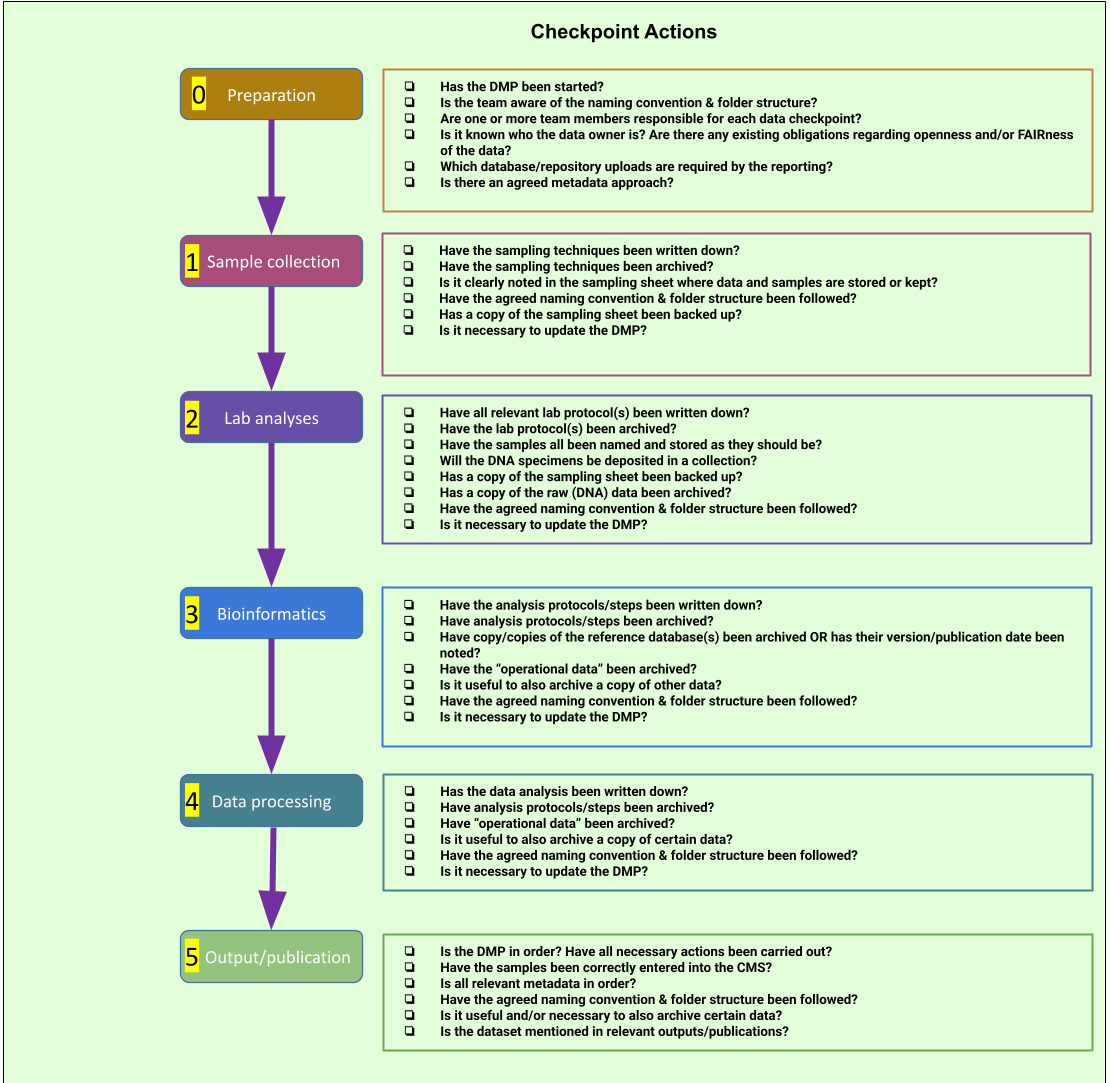
Preparation
- Has the DMP been started?
- Is the team aware of the agreed upon naming convention & folder structure?
- Are one or more team members responsible for each data checkpoint?
- Is it known who the data owner is? Are there any existing obligations regarding openness and/or FAIRness of the data?
- Which database/repository uploads are required by the reporting?
- Is there an agreed metadata approach?
Has the Data Management Plan (DMP) been started?
It’s always a good idea to start a DMP as soon as possible, preferably at the conceptual stage of the project and at least during the first stage of the the eDNA research workflow. At INBO, we provide specific support to researchers in writing, maintaining and implementing DMP’s, from their initial (usually short on content, big on question marks) to their final versions (everything is decided and clearly communicatied) and beyond. Elixir provide excellent resources to help you write your own DMP’s, and many (EU) funders also provide resources and templates (e.g. Biodiversa+)
Is the team aware of the naming convention & folder structure?
These aspects should be agreed upon at either a team, project, or laboratory level before the project begins and documented somewhere, for example, in a lab Standard Operating Procedures (SOP) or a project DMP. The document should be kept securely, for example in an institutional repository or in the Team’s shared data storage location, with clear versioning. It must be compatible with whatever Collection Management System (CMS) your institution uses (this is where samples/data are located & how they are named/labelled).
Are one or more team members responsible for each data checkpoint?
This can be noted in the DMP or another file, e.g. a project spreadsheet. If you choose to make a checklist for your workflow, such as the image here, you can also note the name of the responsible person alongside the necessary checks.

Is it known who the data owner is? Are there any existing obligations regarding openness and/or FAIRness of the data?
There may be multiple data owners. It may be that, according to agreements with partners, funders, etc., the data can never be shared openly or FAIRly, or conversely, it must be shared openly and FAIRly. If this is already agreed upon before the research begins, the data can be managed from the start with this in mind. The situation must also be explained in the DMP, where data ownership, any restrictions or sensitivities relating to the data, and the plans for data publication should be detailed. Where data cannot be made open, something to keep in mind is whether you can still make the record of the data (and it’s metadata) open, with a contact point for any interested parties. In this way, at least the existence of the data is made known.
Which database/repository uploads are required by the reporting?
This is an open question - Can a general approach be decided upon (e.g., one database per type of data, etc.)? Different data types generated throughout the workflow are typically deposited in different repositories, which can have different metadata requirements. If there is a required metadata standard for a required database, consider whether it is logical to use this metadata standard from the very beginning and note this in the DMP. For example, if you wish to publish data on GBIF, you will usually need to use the Darwin Core metadata standard. Starting with the correct metadata format from the beginning will save considerable effort later.
Common repositories used in accordance with eDNA data are:
-
Raw sequence data –> internal back-up drive and publicly through ENA or SRA (also see ENA-submission guide by Elixir)
-
Occurrence data –> GBIF, by uploading a Darwin Core Archive to an Integrated Publishing Toolkit (IPT) instance
-
Reference databases, scripts, downstream processed data (from OTU/ASV tables to extended and statistically analysed datasets to answer particular research questions) –> Zenodo
-
Protocols –> publicly available institute or project website or wiki page (for example, INBO’s Protocol website)
-
DNA specimens, or other physical samples –> Institute collection [insert section on CMS here?]
-
DMP —> your institute RIMS (Research Information Management System), or if you want or are obligated to publish your DMP, this can also be placed on e.g. Zenodo
More details are presented in the Output/Publication section.
Sample collection
- Have the sampling techniques been written down?
- Have the sampling techniques been archived?
- Is it clearly noted in the sampling sheet where data and samples are stored or kept?
- Have the agreed upon naming convention & folder structure been followed?
- Has the sampling sheet been backed up?
- Is it necessary to update the DMP?
Have the sampling techniques been written down?
The description of the sampling techniques does not need to be highly detailed. Reference to documentation (e.g., SIP, SAP, SOP, SFP, SPP) (Standard Instrument Protocols; Standard Analytical Protocols; Standard Operating Procedures; Standard Field Protocols; Project-Specific Protocols) or mentioning, for example, filter method, volumes, etc., in the field forms of the sampling sheet is often sufficient. Don’t be afraid to write your own protocols, but have a look around first - there is often already one out there that can suit your needs, or at least save you some time by giving you a good starting point. If the technique is fairly simple, you can choose to include the description in the DMP instead. If there is a deviation from the described sampling techniques, e.g., for practical reasons, note this in the DMP as well (and in your sampling sheet!).
Have the sampling techniques been archived?
Pay attention to documentation and apply version control - where possible, make use of existing templates. Deposit this documentation in online repositories, e.g. on an institute or project-specific web portal (INBO’s internal archive, INBO protocol helper), or wiki page, or in absence of such, on a readily available repository like Zenodo. If it is described in the DMP, ensure that the DMP is deposited in the RIMS of your institute (INBO’s PURE).
Is it clearly noted in the sampling sheet where data and samples are stored or kept?
Does your institution have a managed DNA-sample collection? If so, great! Hopefully the locations and manner of storage of each sample is always clearly noted. If not, do your best to keep these records accurate and up to date. (NB: If you wish to begin managing your institutions DNA collection in a more standard fashion, please see resources such as Veltjen et al., 2024 for more information). Bringing samples to the lab follows an agreed intake procedure. At INBO, samples are brought to the genetics laboratory in consultation with the lab team. Upon intake, a registration form (Google Forms) must be completed, specifying the storage conditions required: room temperature, cold room, or freezer. Each sample receives a checklist number, which is physically labelled on the sample and registered in the central overview (Google Forms Response Sheet, i.e. sampling sheet), linking all relevant metadata to the sample for both physical and digital traceability via the CMS.
After processing, a storage decision must be made: samples kept for less than 5 years and those intended for longer-term archiving are stored in different locations.
If a storage decision has not yet been made upon sample collection, ensure this is followed up on and updated both in the sampling sheet (recording sample metadata) and in the CMS before moving onto the next step.
Have the agreed upon naming convention & folder structure been followed?
The sample ID must follow a convention, ideally one that is established before the project begins and is as streamlined over multiple projects as possible. The naming convention can further be noted in the project SOP or DMP. What matters most is that these sampling IDs are consistent and compatible with the CMS.
For eDNA samples at INBO, the following convention is used:
E[year][filtertype][4-digit tracking number][handling steps with impact on physical sample], e.g.
E2026STF1009PC
Conventions:
Eindicates an eDNA sampleyearis the full 4-digit yearfiltertypeindicates the filter type used during sampling4-digit tracking numberis a unique sequential identifier, from 0 to 9999 within a sampling yearhandling stepsare optional suffixes indicating post-collection processing steps that affect the physical sample (e.g.PCfor PowerClean).
Upon registration in the CMS, the sample ID may be extended with additional components to reflect further processing steps or linkage to project metadata.
For downstream processing, whether this entails registration and follow-up through the CMS or statistical analyses and dataset creation for Zenodo or GBIF publication, more detailed suffixes or additional identifier components may be added, for which the metadata is already available in the sampling sheet. These choices may reflect the specific research question or analysis at hand, but should always build on the base sample ID convention, either as described above or as decided upon at the start of the project. This ensures traceability back to the original sample across all datasets and publications, which is crucial!
Elixir also provide extra information on choosing a naming convention.
Has the sampling sheet been backed up?
As the sampling sheet is the key to understanding and using the data, ensure a backup copy is maintained regularly, for example on a cloud storage drive or secondary local drive. (See also Sample collection checkpoint).
Is it necessary to update the DMP?
Have you changed something about the sampling techniques or conventions? If the answer to thi question is YES: you need to update the DMP! See it as a living document which grows while the project evolves - it can have as many versions as necessary.
Lab analyses
- Have all relevant lab protocol(s) been written down?
- Have the lab protocol(s) been archived?
- Have the samples all been named and stored as they should be?
- Will the eDNA samples or DNA specimens be deposited in a collection?
- Has the sampling sheet been backed up?
- Has the raw (DNA) data been archived?
- Have the agreed upon naming convention & folder structure been followed?
- Is it necessary to update the DMP?
Have all relevant lab protocol(s) been written down?
For example, the DNA extraction protocol. Use version control, e.g. git and GitHub (for better version control, you can link a GitHub repo with a zenodo record, see INBO’s tutorial for more info).
Some protocols may be manufacturer-specific and can be referenced rather than reproduced in full.
At INBO, a project-specific lab update file is maintained on our internal Google Drive, where all information regarding lab protocols and outcomes is collated during the project and available to all staff working on the project. This serves as a practical working document and can later be used to update the protocols described in the DMP.
Have copies of the lab protocol(s) been archived?
Follow the same archiving approach as described in the Sample Collection checkpoint: use version control, deposit on an institute or project-specific web portal or wiki page, or on Zenodo if no such portal is available. Ensure the DMP is deposited in the RIMS of your institute (e.g. INBO’s PURE).
Note that the project-specific lab update file on Google Drive (see above) can serve as a guide regarding which protocols to update and/or list in the DMP.
Have the samples all been named and stored as they should be?
Check the sampling sheet at this stage to verify that all samples follow the agreed naming convention and are stored at the correct location, as described in the Sample collection checkpoint. Any discrepancies should be resolved and noted before moving to the next step.
Will the eDNA samples or DNA specimens be deposited in a collection?
At this stage, the residual fraction of the eDNA sample may be ready for (long-term) archiving. Check the Sample Collection checkpoint for the archiving requirements and storage conditions. Ensure the sample location after processing is updated in both the sampling sheet and the CMS, and reflect any archiving decisions in the DMP.
For a sample or specimen to be eligible for long-term storage in the INBO collection, a number of minimum quality requirements need to be met:
- The sample collection is well-documented
- The sample was ethically and legally obtained
- The sample is relevant to Flemish biodiversity
Note that embargoes may be applied here in two ways: on the data generated through the eDNA workflow, and on the physical sample in the collection. The embargo on the physical sample allows analyses to be completed before the sample appears in the publicly accessible version of the collection inventory.
Has the sampling sheet been backed up?
See also the earlier Sample Collection checkpoint. Ensure a backup copy is maintained regularly, for example on a cloud storage drive or secondary local drive.
Has the raw (DNA) data been archived?
As soon as possible, after the completion of the analyses, archive the raw (DNA) data, e.g. in a cloud storage drives (INBO’s internal Google drive). Raw data files can be very large - Make sure you have sufficient storage space available. This may need to be budgetted for in your project planning.
Have the agreed naming convention & folder structure been followed?
See also the earlier Sample Collection checkpoint. Certain samples may receive a suffix in their sample ID as a result of laboratory handling. A regular check and update of naming convention (including the definition of such suffixes) and folder structure at this stage is important to automate workflows and avoid mistakes in subsequent steps.
Is it necessary to update the DMP?
Are there aspects of the DMP that have changed and/or need to be expanded? If there is a deviation from this workflow and/or the protocol(s) used, update the DMP.
Bioinformatics
The bioinformatics step is primarily relevant for metabarcoding analyses, where raw sequencing data must be processed through a pipeline to yield operational data such as OTU or ASV tables. For barcoding analyses (e.g. qPCR or ddPCR), this step is largely absent or greatly reduced, as in that case raw data is typically processed directly by the instrument software or a minimal analysis pipeline and results are therefore ready for data processing at an earlier stage. If you are working with barcoding data, you may therefore proceed more quickly to the Dataprocessing checkpoint.
- Have the analysis protocols/steps been written down?
- Have the analysis protocols/steps been archived?
- Have the used reference database(s) been archived OR has their version/publication date been noted?
- Has the “operational data” been archived?
- Is it useful to also archive other data?
- Have the agreed upon naming convention & folder structure been followed?
- Is it necessary to update the DMP?
Have the analysis protocols/steps been written down?
Examples:
- A standard set of steps to demultiplex sequencing data
- A step-by-step protocol of the bioinformatics analysis pipeline
At INBO, the development of bioinformatics protocols typically follows a two-stage documentation process. Working notes, how-to pages, and tutorials are first developed and maintained on internal platforms — previously Confluence, now BookStack — allowing team members to collaboratively figure out and refine analytical steps. Once a pipeline or protocol step is sufficiently mature, a versioned, publication-ready version is documented on GitHub for version control and public accessibility. The INBO code base repository is currently under review and will be made available soon.
At the project level, it is good practice to list in the sampling sheet and/or DMP which specific steps, processes, or pipelines were followed. This ensures that the bioinformatics choices made are traceable and reproducible at the project level, even when the underlying protocols are still under active development on BookStack.
Have the analysis protocols/steps been archived?
The two-stage documentation process described above applies here as well — internal BookStack pages serve as the working archive during development, while GitHub and Zenodo serve as the publication-ready archive. At the project level, ensure that the DMP lists which pipeline versions or steps were used, and is itself deposited in the institute RIMS (e.g. INBO’s PURE).
Have the reference database(s) been archived OR has their version/publication date been noted?
Reference databases are a critical component of metabarcoding analyses, as results are directly dependent on the database used. Deposit the reference database(s) on Zenodo and, where possible, also archive them internally. Note the version or publication date used and provide a link to the Zenodo record by its Digital Object Identifier (DOI). If an internal multihit list was used, also note its version or date.
Has the “operational data” been archived?
This concerns archiving the outputs of the bioinformatics step, e.g. OTU (Operational Taxonomic Unit) or ASV (Amplicon Sequence Variant) tables. These form the basis for all downstream data processing and a copy of each should be archived as soon as they are generated. Refer to the Preparation checkpoint for an overview of recommended repositories.
Is it useful to also archive other data?
Per project, consider whether there are meaningful ‘savepoints’ during the bioinformatics workflow, for example:
- Demultiplexed data
- Outputs of computationally intensive steps, worth archiving as a backup
- Data supplied to clients or partners
- Data used for other internal projects that must be published later
Ensure there is a clear README with all savepoints, including the script/steps taken to reach that point.
Have the agreed naming convention & folder structure been followed?
Per sample, maintain naming conventions as described in the Sample Collection checkpoint. For bioinformatic processes, a translated digit-only version of the sample ID is created, which can always be traced back via the sample sheet.
Consistent naming and folder structure at this stage is important to automate downstream workflows and avoid mistakes in subsequent steps.
Is it necessary to update the DMP?
Are there aspects of the DMP that have changed and/or need to be expanded? If there is any deviation from this workflow and/or the protocol(s) used, update the DMP. See it as a living document that grows as the project evolves.
Dataprocessing
Data processing applies to both barcoding and metabarcoding analyses, albeit starting from different inputs: for barcoding (e.g. qPCR or ddPCR), processing typically starts from concentration values or presence/absence results generated directly from the instrument; for metabarcoding, it starts from OTU/ASV tables generated in the bioinformatics step. From this point, the workflow and data management considerations are largely the same for both approaches.
- Has the data analysis protocols/steps been written down?
- Have the data analysis protocols/steps been archived?
- Has the “operational data” been archived?
- Is it useful to also archive certain data?
- Have the agreed upon naming convention & folder structure been followed?
- Is it necessary to update the DMP?
Has the data analysis protocols/steps been written down
Examples:
- A standard set of steps to perform a specific statistical analysis
- Relevant scripts and phyloseq objects (metabarcoding)
- Concentration calculations or standard curve analyses (barcoding)
Document the necessary information to make the data processing reproducible.
In R, for example, use the {renv} package to manage package versions, or at minimum document the package and operating system versions used by saving the output of sessionInfo().
Use version control, e.g. via git and GitHub.
At the project level, list in the sampling sheet and/or DMP which specific steps, processes, or pipelines were followed, consistent with the approach described in the Bioinformatics checkpoint.
Have the data analysis protocols/steps been archived?
Deposit data analysis scripts on Zenodo or an institute-specific repository, and ensure the DMP is deposited in the institute RIMS (e.g. INBO’s PURE).
Has the “operational data” been archived?
When a dataset is considered ‘ready’ (i.e. will not be further edited), this is the moment to archive it. This includes processed datasets derived from OTU/ASV tables, statistically analysed datasets, and any datasets prepared to answer a specific research question. Refer to the Preparation checkpoint for an overview of recommended repositories.
Is it useful to also archive certain data?
Per project, consider whether there are meaningful ‘savepoints’ during data processing, for example:
- Intermediate datasets supplied to clients or partners
- Data used for other internal projects that must be published later
- Outputs of computationally intensive steps, worth archiving as a backup
Ensure there is a clear README documenting all savepoints, including the scripts or steps taken to reach each one.
Have the agreed naming convention & folder structure been followed?
Continue using the original Sample ID, following the naming conventions in the Sample Collection checkpoint. This step is important to automate workflows and avoid mistakes in the next steps.
Is it necessary to update the DMP?
Are there aspects of the DMP that have changed and/or need to be expanded? If there is any deviation from this workflow and/or the protocol(s) used, update the DMP. See it as a living document that grows as the project evolves.
Output/data publication
This is the final checkpoint, where all data and outputs are published, archived, and made findable. It is also the moment to ensure the full workflow is properly documented and that all previous checkpoints have been completed. Refer to the Preparation checkpoint for an overview of recommended repositories and their metadata requirements; if these were kept in mind from the start then this step should be straightforward.
- Is the DMP in order?
- Have all necessary actions been carried out?
- Have the samples been correctly entered into the CMS?
- Is all relevant metadata in order?
- Have the agreed naming convention & folder structure been followed?
- Is it useful and/or necessary to also archive a copy of certain data?
- Is the dataset mentioned in relevant outputs/publications?
Is the DMP in order? Have all necessary actions been carried out?
Review the DMP in full and ensure all sections are up to date. Add an annex to the DMP with the data publication workflow. If the research outputs or data publications are deposited in the institute RIMS (e.g. INBO’s PURE), do not forget to add a link to the DMP. Update the DMP one final time if anything has changed.
Have the samples been correctly entered into the CMS?
This is a final check. Perform a random check of a subset of the used samples to verify that all entries are complete, correctly named, and linked to the correct project and storage location.
Is all relevant metadata in order?
Multiple datasets are often generated from the same workflow. Therefore, check the metadata of all of them. Ensure metadata is consistent across datasets and compliant with the requirements of the target repositories (e.g. Darwin Core for GBIF, EML for Zenodo). If metadata standards were followed from the start as recommended in the Preparation checkpoint, this stage should require minimal effort.
Have the agreed naming convention & folder structure been followed?
Examples:
- Check the folder structure
- Are there still “loose” undocumented scripts or files?
- Are there poorly named files?
- Are all files accounted for in a
READMEor equivalent documentation?
Is it useful and/or necessary to also archive certain data?
Per project or publication, consider which data needs to be archived to support the output or publication. Consider archiving on the institute’s cloud storage drive (INBO’s internal Google Drive Archive) and/or an online repository such as Zenodo. Follow your institute’s Archive Policy where applicable.
Is the dataset mentioned in relevant outputs/publications?
Ensure that datasets are cited and linked in any associated outputs or publications. Follow your institute’s open data and open access policy. INBO has both an Open Data policy and an Open Access policy, which, along with Belgian (Dutch/French resource) and European laws, provides a framework within which to make decisions regarding the use of embargos versus direct publication. Additionally, despite INBO being an independant research organ, it is still part of the Flemish government and therefore certain data, documentation and outputs are also governed by the Belgian “Transparency in public administration” (“Openbaarheid van bestuur”) legislation (Dutch resource). We are currently working on specific guidelines for eDNA data, including publication timelines, which will be included in a future update.